Showing posts with label learning spaces. Show all posts
Showing posts with label learning spaces. Show all posts
Saturday, March 06, 2010
Shared Media in Second Life Viewer 2
Trying out the new shared media - `web on a prim` with our Moodle course in the new Second Life viewer 2.0.

Wednesday, November 18, 2009
Video Streaming on the Collective Island
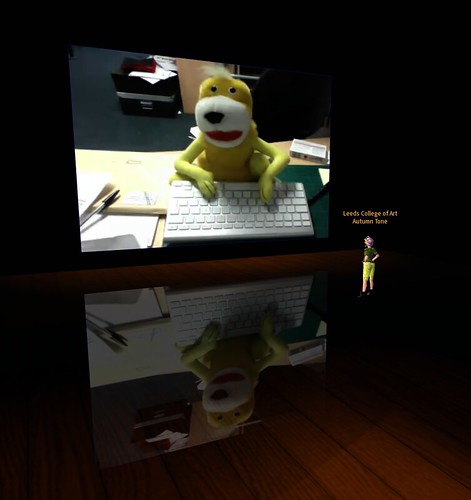
With our college getting a Quicktime Streaming Server up and running, I can finally look at some ideas of how to combine Live Video with Second Life activities.
Certainly it starts opening up the opportunity of broadcasting live performance works at the college into a SL gallery context, as well as RL/SL mashup performances.
I certainly want to look at ways of getting the students to take ownership of it - as a way of creating live shows / and mixed reality events.
What's good is the server is constantly on ( well if it doesn't crash ) - and the streams are accessible from outside the college firewall. Presently live broadcasts have to be done from within the college, so we'll have to see if in the future we can get access to the Quicktime server when we're offsite.
Something I'm quite excited about exploring in the future, is how it can also be tied into Life Long Learning & Creative Industry events - by streaming guest speakers from the college into SL - to be accessible by far a field Alumni, and 'friends' of the college who can't attend in RL.
Anyway , that's the new toy to play with for a while....
Thursday, March 27, 2008
Twinity - Using URL's in a Picture
Link to higher quality mp4 file
A 3 minute video of how to place a Picture to display a webpage. This video shows a link to blip.tv - which demonstrates how to bring Video streaming into Twinity by embedding the media within a webpage. Quicktime does not seem to be supported, but flash based material like blip.tv and youtube works fine. For now this show's you can present a video exhibition inside Twinity.

Using Chatterous Persistant Chatroom in Twinity.
With the aid of Chance Abattoir and Jurin Juran, we had a play with the URL on a Picture object. This was set to display a Chatterous room. We could input text to the chat room with no problems thru interaction with the picture in Twinity, including Pasting text ... ( though copying text from the Twinity webpage didn't seem to work ).
It seemed for us inworld we saw our own web pages, especially at Login, rather than the watching one operator surfing the web. This could be a problem if a tutor, wants to take a group on a guided tour thru flat based - webmaterial, ie. Slideshare.
For a webpage that required login (ie. Moodle), when I swapped from one avatar to another - I didn't need to login again. It seemed that the Twinity Client was keeping the computer logged into a website, rather than against a avatar account, which could be a real problem with multiple people using the same computer to access learning materials thru Twinity. ( I will investigate this further.... )
Sunday, March 23, 2008
First 30mins in Twinity
I'm always looking at what other Virtual Worlds are available for use in Education or Art Exhibition. Recently my beta account for Twinity came thru, so I booted up a PC to give it a whirl.
There is little client documentation to get you into making your 'apartment' your own look. So with a bit of experimentation I threw myself into making some attempt at customising the space I was given.

a very uncluttered interface...
As I was more focused on seeing how I could get work displayed. I concentrated on the picture objects that could be added to the environment.
It was a pleasent suprise to find I could do HTML on a Prim :) - by setting the picture frame to a URL rather than an uploaded image. This webpicture (though clunky to operate) - I could navigate the website on the wall or switch to fullscreen browsing mode as well. ( I'll have to get a group of people in to try to see if they see the same webpage whilst its being browsed by someone else ).
Manipulating objects at first is a bit fiddly and limited.... but not dissimilar to IMVU. Give it a few more hours, and I'll be throwing stuff about - ah feeling like a newb again.
Within 10 minutes of creating my location, a Twinity support avatar popped in to say 'hi', - how nice I feel like I had neighbours ;)

the obligatory virtual world shrug snapshot
First impressions, I'll give it more time to explore. It immediately proved that I could use an 'apartment' as an 'Flat based / Weblinked' Art Portfolio.
But the furniture ( apart from lights ) I can't interact with ( eg. sitdown ) - perhaps in the next patch..
Building and scripting 3D content though doesn't seem immediately obvious, ( I think a trawl thru the forum is required. ) - Though Manon (the Twinity support avatar) said end-users couldn't script yet.
So we'll have to see what the future brings...
Anyway if you get into Twinity - search for Leeds College of Art and Design
There is little client documentation to get you into making your 'apartment' your own look. So with a bit of experimentation I threw myself into making some attempt at customising the space I was given.

a very uncluttered interface...
As I was more focused on seeing how I could get work displayed. I concentrated on the picture objects that could be added to the environment.
It was a pleasent suprise to find I could do HTML on a Prim :) - by setting the picture frame to a URL rather than an uploaded image. This webpicture (though clunky to operate) - I could navigate the website on the wall or switch to fullscreen browsing mode as well. ( I'll have to get a group of people in to try to see if they see the same webpage whilst its being browsed by someone else ).
Manipulating objects at first is a bit fiddly and limited.... but not dissimilar to IMVU. Give it a few more hours, and I'll be throwing stuff about - ah feeling like a newb again.
Within 10 minutes of creating my location, a Twinity support avatar popped in to say 'hi', - how nice I feel like I had neighbours ;)

the obligatory virtual world shrug snapshot
First impressions, I'll give it more time to explore. It immediately proved that I could use an 'apartment' as an 'Flat based / Weblinked' Art Portfolio.
But the furniture ( apart from lights ) I can't interact with ( eg. sitdown ) - perhaps in the next patch..
Building and scripting 3D content though doesn't seem immediately obvious, ( I think a trawl thru the forum is required. ) - Though Manon (the Twinity support avatar) said end-users couldn't script yet.
So we'll have to see what the future brings...
Anyway if you get into Twinity - search for Leeds College of Art and Design
Subscribe to:
Posts (Atom)