Showing posts with label machinima. Show all posts

Monday, October 12, 2009

Exploring Shot Composition Basics with SL

I've played with creating some Photography Grid HUD's before, and I thought I'd refine it into a post comparing two classic principles.

Rule of Thirds


Rule of Thirds Grid

The Rule of Thirds, is the division of the frame into equal thirds vertically and horizontally. The intersection of the lines are considered focus of interests, and the lines themselves can help balance out the element of the shot.

Rule of Third Layout

The focus of interest here is the face - which falls into the topright intersection. The body ( mainly head and spine ) falls on the right vertically third. and the ground lies along the bottom third.

Rules of Third Shot

The Final Shot -
more info on Rule of Thirds here


Dynamic Symmetry


Dynammic Symmetry Grid

Dynamic Symmetry is based on the Golden Section. Draw lines diagonally from each corner of the frame, then draw lines perpendicular to the first lines that go back to the opposite corners. Again the intersections of the lines are the hotspots of interest.

Dynamic Symmetry Layout

Again the focus of interest is the face, falling into the top right intersection. The body falls vertically between the two areas of interest, and the ground runs through the areas of interest on the bottom.

Dynamic Symmetry Shot

The Final Shot.
Some further info on Golden Section / Phi 1.618 here -
and quite a creepy video on Golden Mean here - http://www.youtube.com/watch?v=2zWivbG0RIo

With either principle of composition, it is important to keep things simple - particularly having only ONE focus of interest.

Personally I prefer the dynamic symmetry layout - which seems more visually exciting when applied to a HD video framing.

Wednesday, April 22, 2009

Using the Multi-Cam Machinima Switcher

A while ago, I built a multi-camera switcher in Second Life, when the new CameraParameters function was added to LSL....[link] , a little while later I updated it - with cam points the user could move, via editing the linked prims...[link] and then eventually I got round to writing a blog post about it. ( amazing what you can achieve in 3 years ... )

WHAT is the Multi-Cam Machinima Camera Switcher (MSMCS)?

This tool creates instant vision cutting between 8 camera setups much like a TV Vision Mixer swtiching between multiple cameras in a studio. Using the MSMCS you can block out a range of camera positions, that when you go into production, you can jump between. This is particularly suited for when Machinima is streamed LIVE out of Second Life particularly Interviews style shows, allowing the camera operator to cut from Closeups of Avatars to a wider shot of the stage etc.

For educators, this tool can also be used to exlpore conventions of Film and Video production, particularly Crossing the Line ( 180 degree rule ) or Jump Cuts. As well as developing an understanding of Multi-Camera shoots, when access to Real Life equipment is limited. Also it could be used as a way of quickly developing animatics for video productions.

For Machinima Filmmakers - understand the limitations of this tool, it may be useful for some circumstances and not for others.


HOW to USE the Multi-Cam Machinima Camera Switcher. (MCMCS)

1. Build your Set, Stage, Interview Room.....


2. Rez the MCMCS - and place the big grey square so its somewhere in the middle of your set.


3. Whilst in 'Edit Mode' - move the MCMCS vertically down until the big grey block is under your set...


4. Now to edit the individual cameras - in edit mode panel - click on edit linked parts --- ( click on image below to enlarge it )


5. Each Camera is identified by Colour and settext above it... ( red is camera one ) - the sphere prim is the camera's position , the cube prim the camera's target (ie. where you want to look). Whilst in edit linked parts mode, move the sphere and cube prims to set up the camera shot.


6. Sit on the camera to see what the shot looks like... ( sitting on the camera makes all the cam prims and particles disappear )


7. Camera One ( the red one we just edited ) is selected by pressing the Up Arrow, and your camera view should be updated like so...


8. Stand up your avatar , and go back to point 4, and repeat the process with all the other coloured pairs, to give you upto 8 different camera shot framings.
Each Camera Prim has floating text above them denoting the camera number and the corrosponding arrow key that needs to be pressed.

-------

If you think this is useful for you - you can pick up a copy outside my TechGrrl Store for L$ 25
http://slurl.com/secondlife/Gourdneck/197/233/67

Tuesday, October 28, 2008

Using Camera controls in Second Life

As I'm doing a workshop on using Second Life to teach video production skills at Stirling University this week. I thought it would be useful to create some images to explain the camera controls in Second Life.
Feel free to take a copies and upload into Second Life if you find it useful.
Flickr set here

Selecting your Attention


zoomcam


orbitcam


pancam

or teleport to http://slurl.com/secondlife/The%20Collective/98/42/34

Tuesday, September 23, 2008

Exploring the 'rule of thirds' in Second Life

Whilst doing a real life digital camera induction, I had some thoughts about creating some tools to help explore some of the conventions of photography composition, particularly a rule of thumb called 'Rule of Thirds'.
This led to making a HUD overlay, that presents a grid, dividing up the screen into thirds. ( if you change your screen resolution, edit the HUD so it stretches to the edge of the screen )
The lines and intersections of these lines, are regarded as the sweet points of balancing a composition.


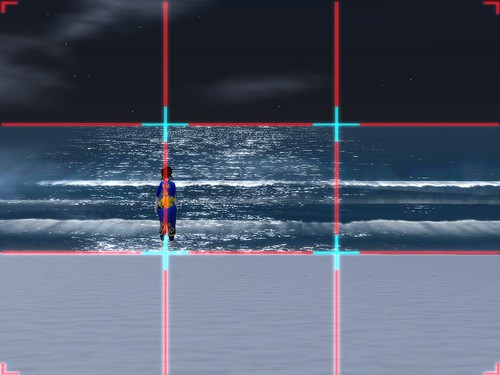
A Rule of Thirds - HUD - used to aid balance of elements in a photographic composition


The Beach and Sea fall along the horizontal lines, whilst Angrybeth falls along the left vertical line.

Though its a simple tool, what excites me, is that it shows Second Life can be used to explore some photographic fundamentals... which if you are based at an institution that may lack a breadth of equipment to do this practically in Real Life, gives us a Virtual opportunity. ( thankfully at our college we have enough equipment, so each student can have a camera, but I know of other places where this resource can be a limited access )
Also I'm interested in using Second Life as an 'interdisciplinary' space, here the tool could be used by students exploring Game Art and Design, who may not traditionally do a project with photography or video , but maybe are exploring shotframing and composition within 'cutscenes' within a video game.
For those that dabble with a range of digital media, Second Life is a great place to reinforce ideas and skills of video / photography production that transfer well to 3D animation or virtual environments.

Thursday, April 10, 2008

The DDM Students in SL - Machinima


A casual vox-pops catching the thoughts and interests of the DDM students using Second Life. This short machinima documentary was created by 2nd Year student Steve Searle, as part of the optional pathway in Moving Image.
I thought I'd share it with you...

Thursday, November 15, 2007

Upping the Ante

Its been a while since I've blogged about the Digital Media courses activities within Second Life.


2nd year project, starting of with an SL based sketchbook.

Now a new academic year, and the course moving to new facilities on the Blenhiem Walk Campus, we've decided to jump in deeper with Second Life as part of the course.

Previously, we had rolled out SL as a more tentative venture, using it via Personal Development and Critical Studies - so we could explore Digital Cultures and Emerging Technology. We were very fortunate to also have a project with Penguin, that allow both staff and students to see the Vocational worth of Second Life.

Now the course is into its 2nd Year, we have Specialist Pathway modules in both Moving Image and Interactive Presentation.

For both of these modules, we decided to have a Second Life based brief, they could choose to undertake. The modules started on the 9th Nov.

Interactive Presentation

The Team brief is to create an Art Gallery within Second Life, which can be used by the other students and potential Artist in Residence projects.
The students have to consider curation within a virtual 3D space, the different forms of media that can be shown, how avatars can navigate, explore and engage the work that will be shown, as well as creating signage for the space. Upon this they will create an intergrated CSS template for a Ning based community and Blog.

It is hoped out of this brief, that students can explore and reflect on the differences of Flash or Web based Gallery and information presentation, with this 3D variant. As well as engaging with Social connectivity aspects of both Second Life and web communities like Ning.

Moving Image

The brief is to create a 2 minute Machinima presentation, to promote the Design for Digital Media course's presence and activity on the Collective's Second Life Island.

Hopefully, through this brief both the creative use of machinima can be explored, but tempered with a corporate sensibility. My gut feeling with more corporate presence within Second Life or similar (PS3 Home or There), there will be a new skill set needed for this convergence industry, and I hope this brief starts to address the portfolio needs of graduating students into this industry.
Also the cross-transferable skills back to video production, still means regardless of it being either traditional video or machinima - the students still has to go through the experience of production management, communicating with cast and crew & editing of footage.

---

With the 1st Years, we've had the opportunity of creating a new 10 credit module called 'Digital Cultures and Technologies', a half practical and theoretical module.

This has given us an opportunity to have a more course wide engagement within Second Life. The project set is called 2020, where we ask the students to design a poster to communicate what they speculate could be future digital ( or other ) experiences, commodities or technologies.

These poster will then also uploaded into Second Life, as part of a display - in the new art gallery the 2nd year's are building.

As part of the module, we've had a seminar on Avatars, which allowed practical play via Second Life.

---

All of these projects will run up till Christmas, which we'll hopefully make open to the public. ( though actually the islands always open to the public, so you can pop by and see work in progress - so excuse the clutter - we're a sandbox, not a polished marketing tool.)


Some of the activity that's been blogged by the students...

http://parkinsonliam.blogspot.com/2007/11/second-life-galleries.html

http://fionnualamurphy.blogspot.com/2007/11/new-shiny-work-area.html

As a team, Liam and Fio, have initially created a 3D sketchbook to house both there research and idea development, and a place to try out building prototypes.

( which actually reminds me, I get a few IM's saying that there's seems to be little happening on our island... actually a lot happens its just tends to be up at 500 ms )

here's some posts from the 1st years, after playing with avatar creation for an afternoon.

http://markscrit.blogspot.com/2007/10/second-life.html

http://myworldmylifemytime.blogspot.com/2007/10/second-life.html
http://rockbigdave.blogspot.com/2007/09/second-life-at-uni-we-work-d.html
http://digitalbreak.blogspot.com/2007/10/second-life.html

It's also sparked some critical response,

http://critwall.blogspot.com/2007/09/scary-life.html

Tuesday, July 24, 2007

Using Second Life to support Moving Image specialism on Design for Digital Media.

Moving Image specialism.
Moving image covers all time / screen based work, from live action Video production to 3D / traditional Animation. Projects could include title-sequence design, music videos, short drama and documentary productions.

The production of moving image work using Second Life, other MMO's or Video Game Engines is called Machinima. The practice of Machinima can help re-inforce the practice and theories of professional moving image production, could be used as a form of advanced animatics within a larger moving image production; as well as being a moving image medium in its own right.


A Whale of a Tale, - Angrybeth Shortbread 2006

Transferable skills that can be gained from creating Machinima

Storytelling and Structure
Without a story / narrative / structure / concept , as a starting point, then the machinima will have no co-herent sense or meaning. In the act of creating a machinima, the student's have to work out what they are trying to communicate to the audience, and develop appropriate scripts or storyboards. Dramatic structure and character development can be deeply explored with this technique. As Machinima has very little costs ( well once you have the kit that is ... ) a student can try alternative shot setups and sequences, and explore how they impact on storytelling and meaning.

Shot Compostion / Camera Movement
The camera controls within the Second Life client, are sophisticated enough to allow a student to explore shot framing techniques both moving image and also virtual photography. Lens effects ( field of vision) can be explored to a degree. Scripted objects allow tracking and craning sequences to be explored ( without the considerable cost and health and safety issues that happens in real life ). Focus, exposure techniques and smooth zooming effects are several areas that can't be explored with Second Life machinima at present in realtime.
With the recent addition of dynamic lighting, some exploration of lighting techniques can be applied, especially low-key / chiaroscuro
lighting effects. Though shadows at present can't be cast by objects or avatars.

I've slowly been building learning material for shot framing using machinima here. --- link

Post Production
Second Life has no inbuilt tools for editing shots and sequences created in Second Life. Footage will either be recorded directly to the hard-drive of the computer or onto video tape ( if using video-output from the computer to a video deck ).
Editing the footage would need to be done in programs like eg. Final Cut Pro, Adobe Premiere, or Avid. This allows a student to engage with industry software whilst editing the machinima footage into a fine cut for presentation. Working with machinima footage captured via software, also allows students to explore quicktime compression.

Sound Design

The above example machinima 'whale of a tale' is entirely post-produced sound design, with sound effects synced in the post-production software. This technique, allows students to explore foley sound effects, added dialog replacement, and music compostion. Sound can be generated within Second Life, 10 second samples can be triggered, looped or synced with animation gestures. Streaming audio eg. Mp3 , can also be played into the land plot.
For students focusing more on traditional animation techniques, sound - especially dialog would be pre-recorded before animation would be generated. The mac client quicktime output is mute, so to record sync audio at the same time, the video deck option is the best solution. Alternatively using a piece of software like Soundflower can capture sound running through the sound card.

Art Direction / Production Design
Set design, costume design, props, location can be explored with Second Life. The content creation tools within Second Life can build all the assets required for machinima production, re-inforcing the students understanding of 3D modelling techniques ( that in themselves are cross-transferable to Games Design ). Combined with Shot compostion, genre styles can be explored. On a more management level, exploring Second life user created content for adequate assets, like clothes, props, and even locations, allows the students to explore the professionalism and responsiblites of roles like location manager, as well as co-ordinating a budget.

Directing
One distinction between machinima and 3D animation, are the characters ( avatars ) are controlled by other people online. This requires the machinima maker or team, to think of stratagies to co-ordinate a group of people in front of the camera synchronously. Also having to co-ordinate others, means the team have to break down the production into a schedule giving pragmatic experience of time-project management.