Showing posts with label teaching tools. Show all posts
Showing posts with label teaching tools. Show all posts
Saturday, March 06, 2010
Shared Media in Second Life Viewer 2
Trying out the new shared media - `web on a prim` with our Moodle course in the new Second Life viewer 2.0.

Friday, February 05, 2010
Slideshow Presenter on Reaction Grid

Finally, got round to copying a version of my whiteboard across to ReactionGrid.
This version lacks the overlay tools, but now has a nifty touchdetection control for the pointer instead.
One of the advantages of ReactionGrid (or other Opensims) is that this slideshow board can be resized beyond Second Life's usual 10m prim limit - the version in the image is 30ms wide ... with nothing stopping me making it as wide as the sim :)
( gee that's powerpoint on terrifying scale! )
Sunday, April 26, 2009
Building a new 'lighter' Communal Whiteboard

Its nearly been 3 years since I made my last whiteboard, and I thought it was time to do some tweaking to make a more 'lighter' version.
This 'lighter' version removes the troublesome overlay tools, that seemed rarely used... and focused on just one 'Pointer'.
It uses the newish - llDetectedTouch functions - which allows a user to touch anywhere on the image - and the pointer will move to it. This is so much more friendly than before, originally I had to take control of the avatar - and use arrow keys to move the pointer around, which was made worse when the SL client had the 'Release Keys' button removed.
The new whiteboard can also be turned to any angle, without effecting this function... again the original used sim co-ords, so you had to stick the Board either North,South,East or West facing, and soooo many people wanted it at 45 degrees in the corner of a room.
You can also 'Scale' the board to fit your place, without any adverse action to the Aspect Ratio button on the board - which now set to be proportionate of the scaled board's size. So resize the board down to 2ms wide if you want it in your office, or keep it 10ms wide for the lecture hall.
It still keeps the most important thing though .... group access.
Allowing other avatars to add images to the board by holding down the CTRL key while dragging images/textures over it and also allow other avatars to delete images from the board's slideshow.
A simple addition but it allows a group to add to and edit a group slideshow / photoessay.
If you are more of the didactic nature, you can always switch on the Lock, which only allows the Owner to work with the board.
So, just giving it a little roadtest first, and then in a week or so... put it out in the wild.
Wednesday, April 22, 2009
Creating Content in Second Life ( slideshow )
Presentation from Learning in Virtual World Conference at Sunderland on 21st April 2009 - supported by RSC-Jisc Northern and HE Academy.
This slideshow is aimed at people with little to no knowledge of content creation tools in Second Life.
Creating Content in Second Life
View more presentations from angrybeth.
This slideshow is aimed at people with little to no knowledge of content creation tools in Second Life.
Using the Multi-Cam Machinima Switcher
A while ago, I built a multi-camera switcher in Second Life, when the new CameraParameters function was added to LSL....[link] , a little while later I updated it - with cam points the user could move, via editing the linked prims...[link] and then eventually I got round to writing a blog post about it. ( amazing what you can achieve in 3 years ... )
WHAT is the Multi-Cam Machinima Camera Switcher (MSMCS)?
This tool creates instant vision cutting between 8 camera setups much like a TV Vision Mixer swtiching between multiple cameras in a studio. Using the MSMCS you can block out a range of camera positions, that when you go into production, you can jump between. This is particularly suited for when Machinima is streamed LIVE out of Second Life particularly Interviews style shows, allowing the camera operator to cut from Closeups of Avatars to a wider shot of the stage etc.
For educators, this tool can also be used to exlpore conventions of Film and Video production, particularly Crossing the Line ( 180 degree rule ) or Jump Cuts. As well as developing an understanding of Multi-Camera shoots, when access to Real Life equipment is limited. Also it could be used as a way of quickly developing animatics for video productions.
For Machinima Filmmakers - understand the limitations of this tool, it may be useful for some circumstances and not for others.
HOW to USE the Multi-Cam Machinima Camera Switcher. (MCMCS)
1. Build your Set, Stage, Interview Room.....
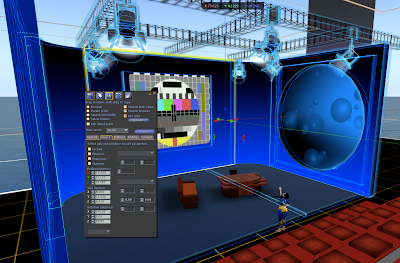
2. Rez the MCMCS - and place the big grey square so its somewhere in the middle of your set.
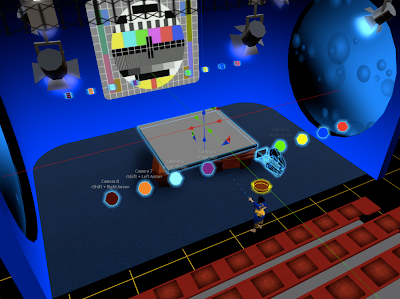
3. Whilst in 'Edit Mode' - move the MCMCS vertically down until the big grey block is under your set...
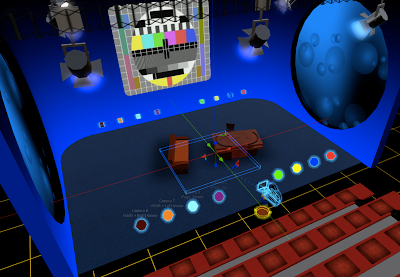
4. Now to edit the individual cameras - in edit mode panel - click on edit linked parts --- ( click on image below to enlarge it )
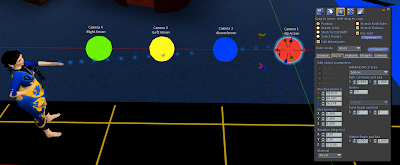
5. Each Camera is identified by Colour and settext above it... ( red is camera one ) - the sphere prim is the camera's position , the cube prim the camera's target (ie. where you want to look). Whilst in edit linked parts mode, move the sphere and cube prims to set up the camera shot.
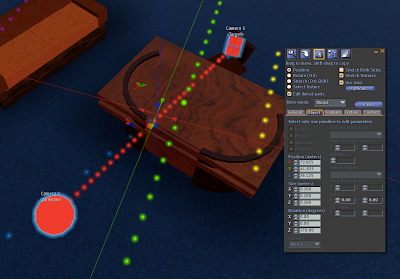
6. Sit on the camera to see what the shot looks like... ( sitting on the camera makes all the cam prims and particles disappear )
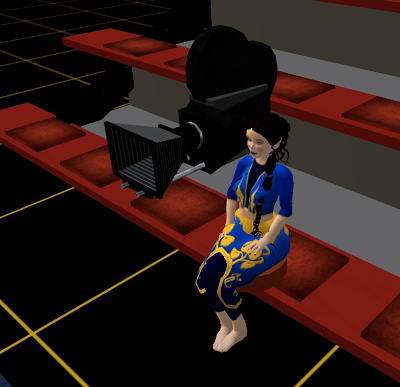
7. Camera One ( the red one we just edited ) is selected by pressing the Up Arrow, and your camera view should be updated like so...
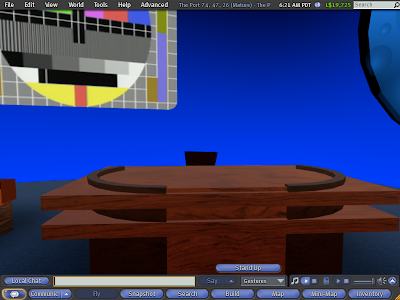
8. Stand up your avatar , and go back to point 4, and repeat the process with all the other coloured pairs, to give you upto 8 different camera shot framings.
Each Camera Prim has floating text above them denoting the camera number and the corrosponding arrow key that needs to be pressed.
-------
If you think this is useful for you - you can pick up a copy outside my TechGrrl Store for L$ 25
http://slurl.com/secondlife/Gourdneck/197/233/67
WHAT is the Multi-Cam Machinima Camera Switcher (MSMCS)?
This tool creates instant vision cutting between 8 camera setups much like a TV Vision Mixer swtiching between multiple cameras in a studio. Using the MSMCS you can block out a range of camera positions, that when you go into production, you can jump between. This is particularly suited for when Machinima is streamed LIVE out of Second Life particularly Interviews style shows, allowing the camera operator to cut from Closeups of Avatars to a wider shot of the stage etc.
For educators, this tool can also be used to exlpore conventions of Film and Video production, particularly Crossing the Line ( 180 degree rule ) or Jump Cuts. As well as developing an understanding of Multi-Camera shoots, when access to Real Life equipment is limited. Also it could be used as a way of quickly developing animatics for video productions.
For Machinima Filmmakers - understand the limitations of this tool, it may be useful for some circumstances and not for others.
HOW to USE the Multi-Cam Machinima Camera Switcher. (MCMCS)
1. Build your Set, Stage, Interview Room.....

2. Rez the MCMCS - and place the big grey square so its somewhere in the middle of your set.

3. Whilst in 'Edit Mode' - move the MCMCS vertically down until the big grey block is under your set...

4. Now to edit the individual cameras - in edit mode panel - click on edit linked parts --- ( click on image below to enlarge it )

5. Each Camera is identified by Colour and settext above it... ( red is camera one ) - the sphere prim is the camera's position , the cube prim the camera's target (ie. where you want to look). Whilst in edit linked parts mode, move the sphere and cube prims to set up the camera shot.

6. Sit on the camera to see what the shot looks like... ( sitting on the camera makes all the cam prims and particles disappear )

7. Camera One ( the red one we just edited ) is selected by pressing the Up Arrow, and your camera view should be updated like so...

8. Stand up your avatar , and go back to point 4, and repeat the process with all the other coloured pairs, to give you upto 8 different camera shot framings.
Each Camera Prim has floating text above them denoting the camera number and the corrosponding arrow key that needs to be pressed.
-------
If you think this is useful for you - you can pick up a copy outside my TechGrrl Store for L$ 25
http://slurl.com/secondlife/Gourdneck/197/233/67
Sunday, March 08, 2009
Avatar Skin and Clothes Map

Avatar skin and clothes map for workshop in content creation in Second Life for 1st Years. Feel free if you think its useful.
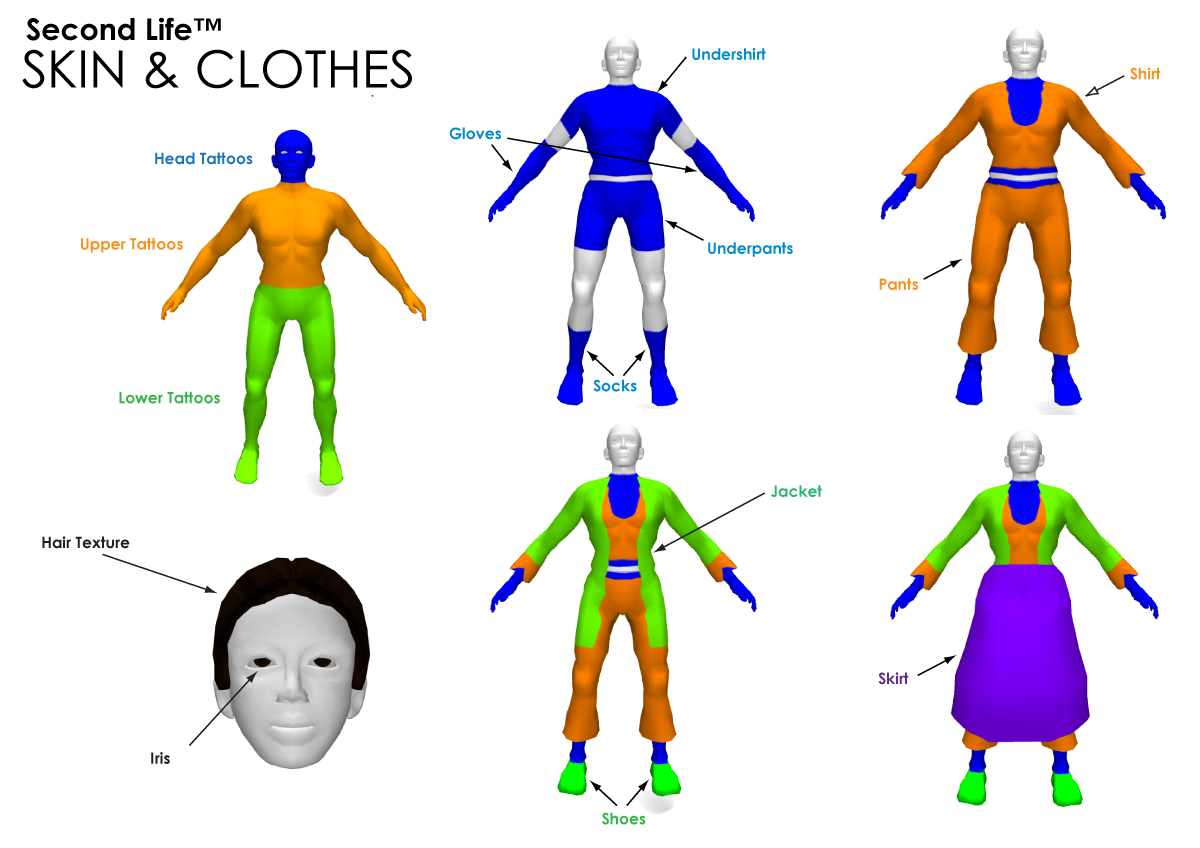
Download
Avatar Attachment Points

Map of Avatar Attachment Points... for workshop teaching SL content creation to 1st Years. Feel free to download a copy if you find it useful.

Download
Tuesday, October 28, 2008
Using Camera controls in Second Life
As I'm doing a workshop on using Second Life to teach video production skills at Stirling University this week. I thought it would be useful to create some images to explain the camera controls in Second Life.
Feel free to take a copies and upload into Second Life if you find it useful.
Flickr set here


or teleport to http://slurl.com/secondlife/The%20Collective/98/42/34
Feel free to take a copies and upload into Second Life if you find it useful.
Flickr set here
or teleport to http://slurl.com/secondlife/The%20Collective/98/42/34
Tuesday, September 23, 2008
Exploring the 'rule of thirds' in Second Life
Whilst doing a real life digital camera induction, I had some thoughts about creating some tools to help explore some of the conventions of photography composition, particularly a rule of thumb called 'Rule of Thirds'.
This led to making a HUD overlay, that presents a grid, dividing up the screen into thirds. ( if you change your screen resolution, edit the HUD so it stretches to the edge of the screen )
The lines and intersections of these lines, are regarded as the sweet points of balancing a composition.

A Rule of Thirds - HUD - used to aid balance of elements in a photographic composition

The Beach and Sea fall along the horizontal lines, whilst Angrybeth falls along the left vertical line.
Though its a simple tool, what excites me, is that it shows Second Life can be used to explore some photographic fundamentals... which if you are based at an institution that may lack a breadth of equipment to do this practically in Real Life, gives us a Virtual opportunity. ( thankfully at our college we have enough equipment, so each student can have a camera, but I know of other places where this resource can be a limited access )
Also I'm interested in using Second Life as an 'interdisciplinary' space, here the tool could be used by students exploring Game Art and Design, who may not traditionally do a project with photography or video , but maybe are exploring shotframing and composition within 'cutscenes' within a video game.
For those that dabble with a range of digital media, Second Life is a great place to reinforce ideas and skills of video / photography production that transfer well to 3D animation or virtual environments.
This led to making a HUD overlay, that presents a grid, dividing up the screen into thirds. ( if you change your screen resolution, edit the HUD so it stretches to the edge of the screen )
The lines and intersections of these lines, are regarded as the sweet points of balancing a composition.
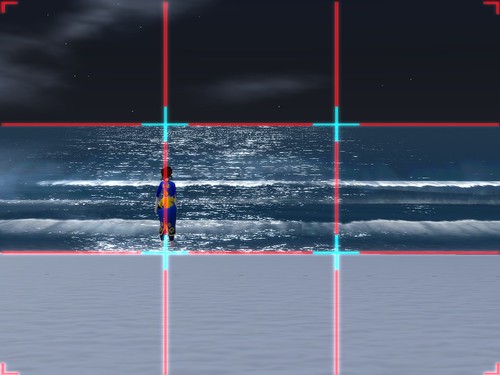
A Rule of Thirds - HUD - used to aid balance of elements in a photographic composition

The Beach and Sea fall along the horizontal lines, whilst Angrybeth falls along the left vertical line.
Though its a simple tool, what excites me, is that it shows Second Life can be used to explore some photographic fundamentals... which if you are based at an institution that may lack a breadth of equipment to do this practically in Real Life, gives us a Virtual opportunity. ( thankfully at our college we have enough equipment, so each student can have a camera, but I know of other places where this resource can be a limited access )
Also I'm interested in using Second Life as an 'interdisciplinary' space, here the tool could be used by students exploring Game Art and Design, who may not traditionally do a project with photography or video , but maybe are exploring shotframing and composition within 'cutscenes' within a video game.
For those that dabble with a range of digital media, Second Life is a great place to reinforce ideas and skills of video / photography production that transfer well to 3D animation or virtual environments.
Sunday, March 09, 2008
HTML on a PRIM (Sort of)

With the new Second Life Release Client 1.19.1, we get a chance to see a feature that will be implemented soon, HTML Pages displayed thru the media streaming texture.
As its kinda useful to some projects I'm doing , I rattled up some basic code last night to slideshow webpages with clickthru to their URL. Feel free to amend and add functionality if useful.
list URLs = ["http://www.leeds-art.ac.uk","http://www.annamorphic.co.uk","http://bbc.co.uk"];  //List of URLS
list Desc = ["Leeds College Website","Angrybeth's Page","BBC homepage"]; //List of URL descriptions - keep in order of List of URLs...

integer slides;
integer slidecount = 0;
string SETURL;
string URLDESC;
default
{
state_entry()
{
llSetTimerEvent(20.0); //Change this for timing of sequence, obviously....
slides = llGetListLength(URLs);

}
timer()
{
if (slidecount == slides)
{
    slidecount = 0;
}

SETURL = llList2String(URLs, slidecount);
URLDESC = llList2String(Desc,slidecount);
llParcelMediaCommandList([
PARCEL_MEDIA_COMMAND_TYPE, "text/html",
PARCEL_MEDIA_COMMAND_URL, SETURL]);
slidecount ++;
}

touch_start(integer touched)
{
key who = llDetectedKey(0);
llLoadURL(who,URLDESC,SETURL);
}
}
Obviously, stick this script inside the prim that is displaying the media texture...
One thing I do like is that llLoadURL - opens the inclient web-browser like the OnRez client. But at the moment it doesn't support Flash

But, when you load a webpage with Quicktime media embedded, it shows up on the Avatars HUD rather than on the webpage.
Joyness!!!
Sunday, December 09, 2007
Using Second Life with a Whiteboard

overlay tools allowed visual annotation over SL during crits.
With a recently installed Promethean ActiveBoard in the studio, we tried a recording of a crit during a studio session.
This was our first opportunity of explore Second Life controlled by the activeboard kit, as well as another way of bringing SL into a blended learning environment.

Click To Play
extract from recorded crit
Using the popup movement and camera controls within SecondLife, the avatar could be controlled via a pen or activeslate. With both a user operating at the board, and an activeslate being passed around, several users could puppeteer an avatar.
The inbuilt screen capture software, recorded both the onscreen action and the group's voices via the laptops microphone.
As first thoughts, this technology quickly enabled us to do a walkthrough of a SL work, with a student evaluating or commenting on the work in realtime. This would be a great way to evidence the process and learning outcomes of the student in a Second Life project. It also creates a video file for use by Second Markers or External examiners - that have no experience of using SL.
as this was a first attempt it revealed issues to resolve:
i) better microphone - or microphone placement to record a group of students clearly.
ii) some experimentation with video capture settings to get a better frames per second.
iii) set aside some time to show students (and other staff ) how to use the whiteboard tools.
Subscribe to:
Posts (Atom)